Skip to content
INTERACTIVE STOREFRONT EXAMPLES

Your own ordering app, with your menu and your name.

Your name. Your food. Your guest’s next order. Explore how a branded storefront brings the experience back to your restaurant.

  • Your branding
  • Pickup and delivery
  • Mobile app experience
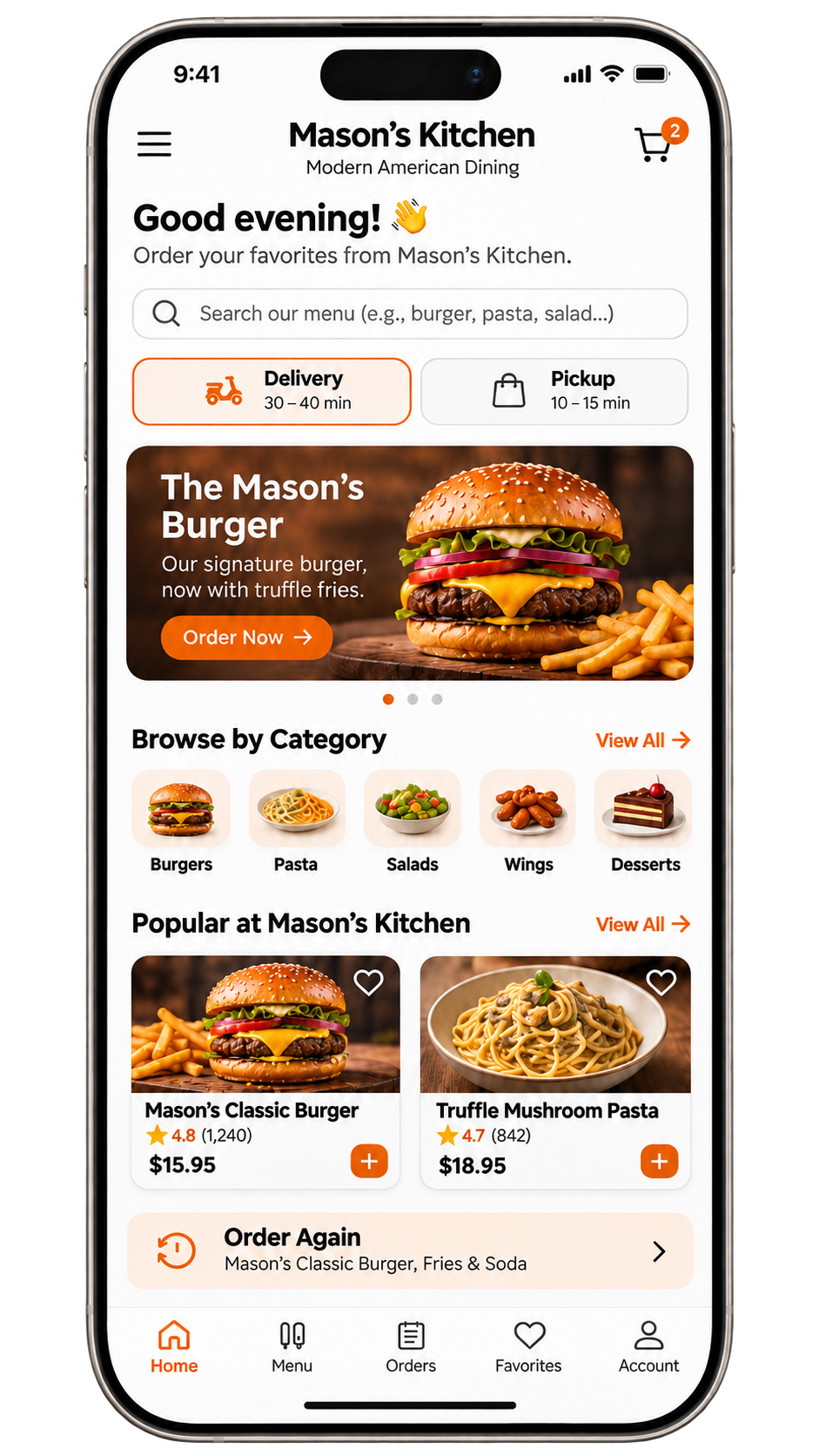
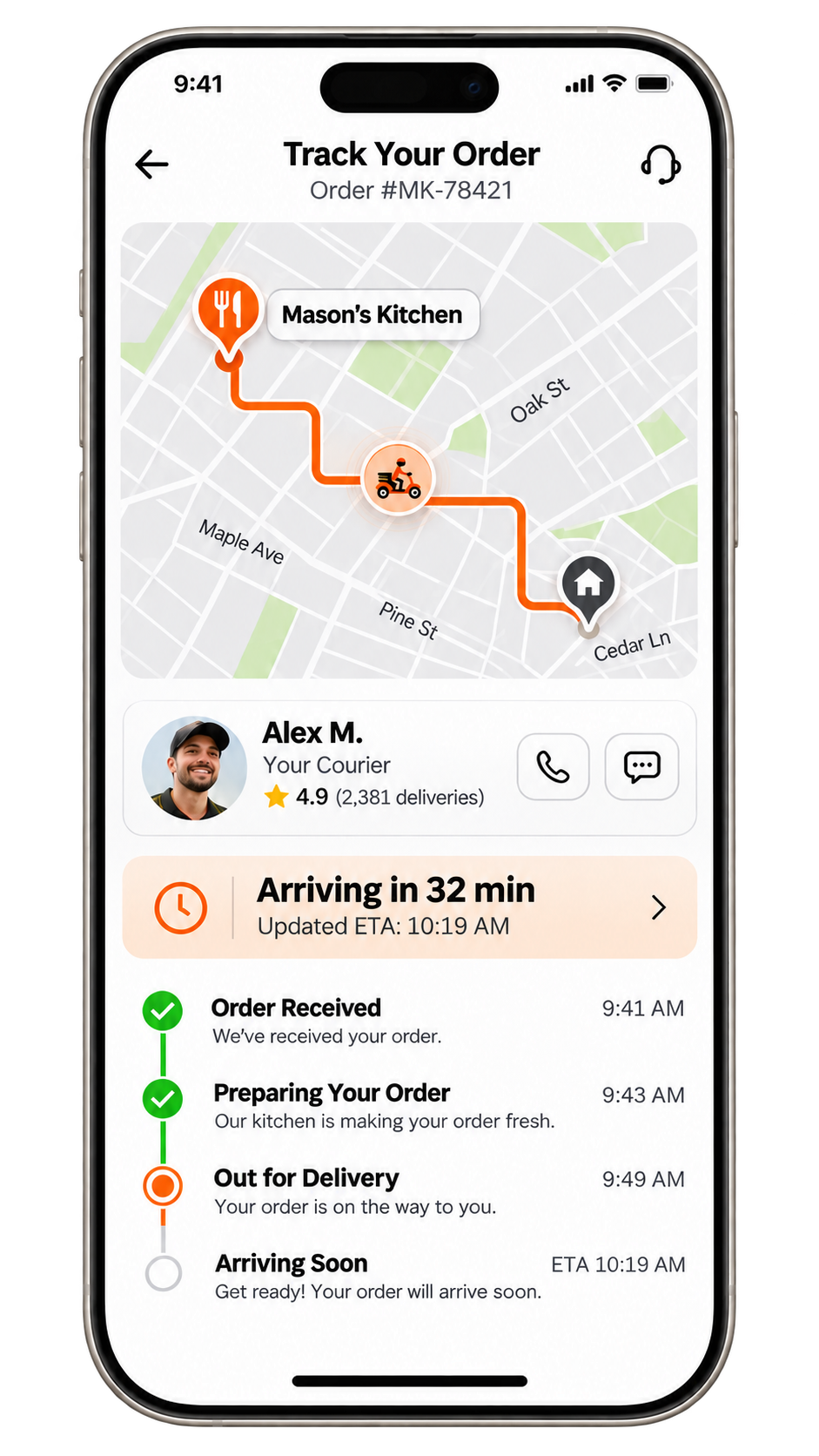
Sample restaurant app home screen with search, delivery toggle, featured burger and popular itemsSample restaurant app delivery tracking screen with live map, courier and arrival timeline
Sample direct order
  • Ordered fromYour site
  • CustomerYour guest
  • Marketplace commissionNone
Illustration only. Processing and delivery charges apply.
Sample restaurants · no live orders
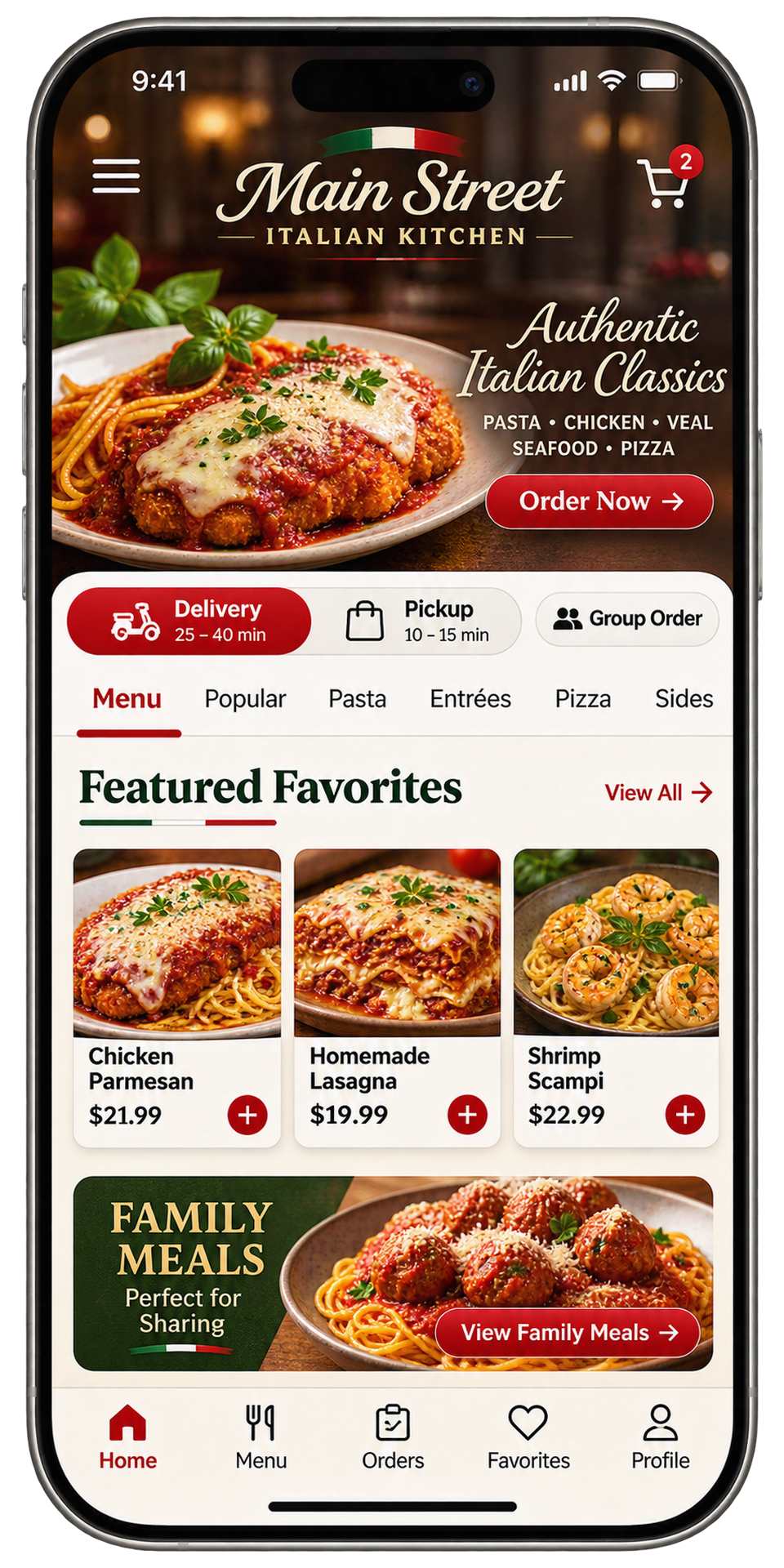
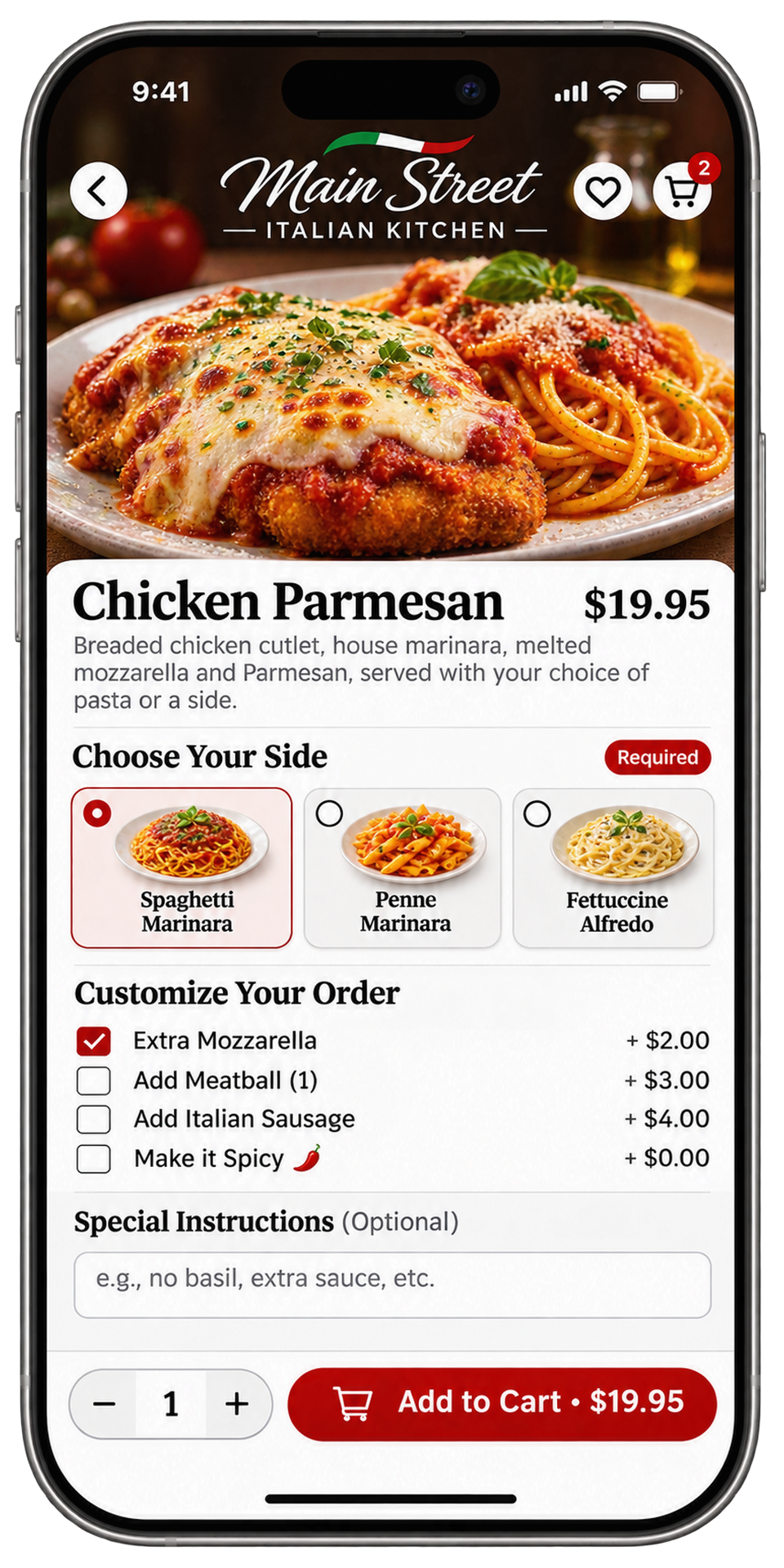
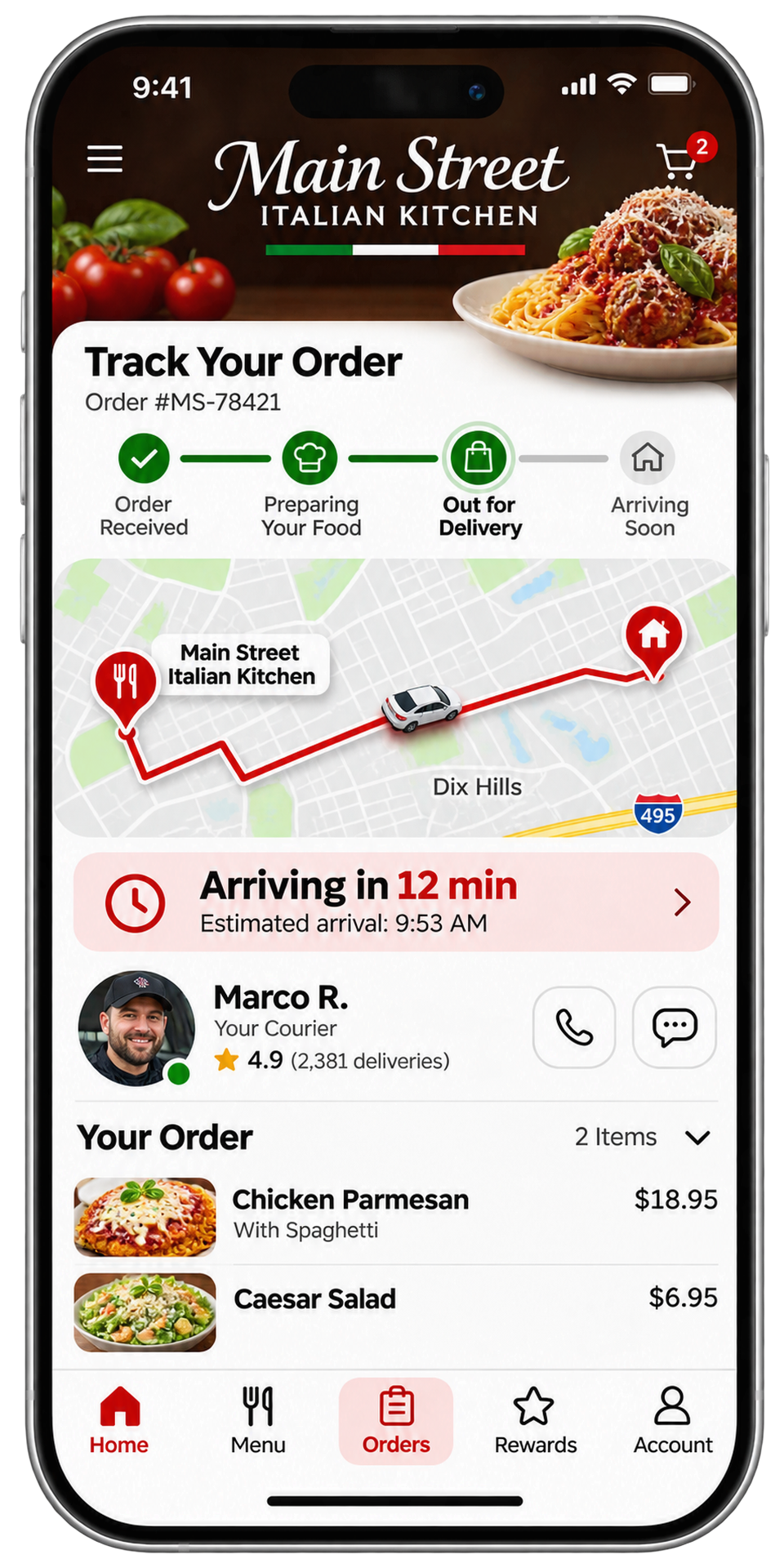
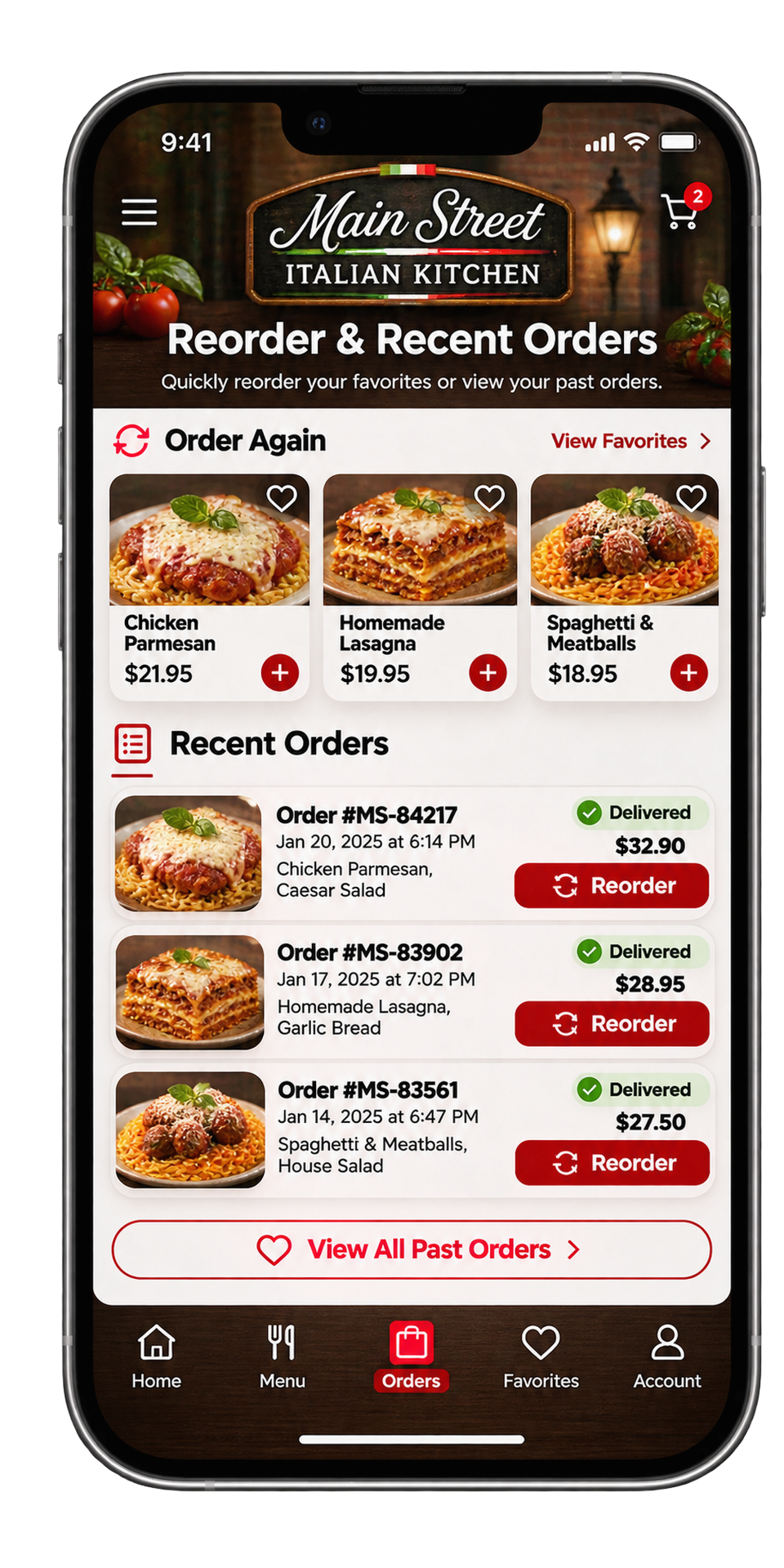
Main Street Italian Kitchen app storefront: delivery or pickup, fees, menu categories and featured dishesMain Street Italian Kitchen app chicken parmesan customization with options and priceMain Street Italian Kitchen app order tracking with live map and courier updatesMain Street Italian Kitchen app past orders with one-tap reorder
Main Street Italian Kitchen — sample app screens. Menus, prices and people are illustrative; no live ordering.

Four screens your guests will use every week

  1. 1

    Storefront

    Your name, photos, ratings, fees and featured dishes — the app opens to your restaurant, not a marketplace.

  2. 2

    Ordering

    Full menu with required choices, add-ons and a clear price before anything is placed.

  3. 3

    Delivery map

    Guests follow their order from preparing to arriving with a live-style map and courier updates.

  4. 4

    Reorder

    Past orders reorder in one tap — the easiest repeat order is the one they already loved.

Sample restaurants, menus, prices and app screens. No payment, live order or courier request is created.

YOUR RESTAURANT’S MOBILE APP

Screen by screen: what your guests get.

Sixteen screens across four journeys — ordering, delivery, loyalty and account. Shown here for a sample restaurant, “Mason’s Kitchen”; yours carries your name, menu, photos and colors.

01

Browse, customize & check out

Guests open your app and order the way they already like to — in a few taps, under your name.

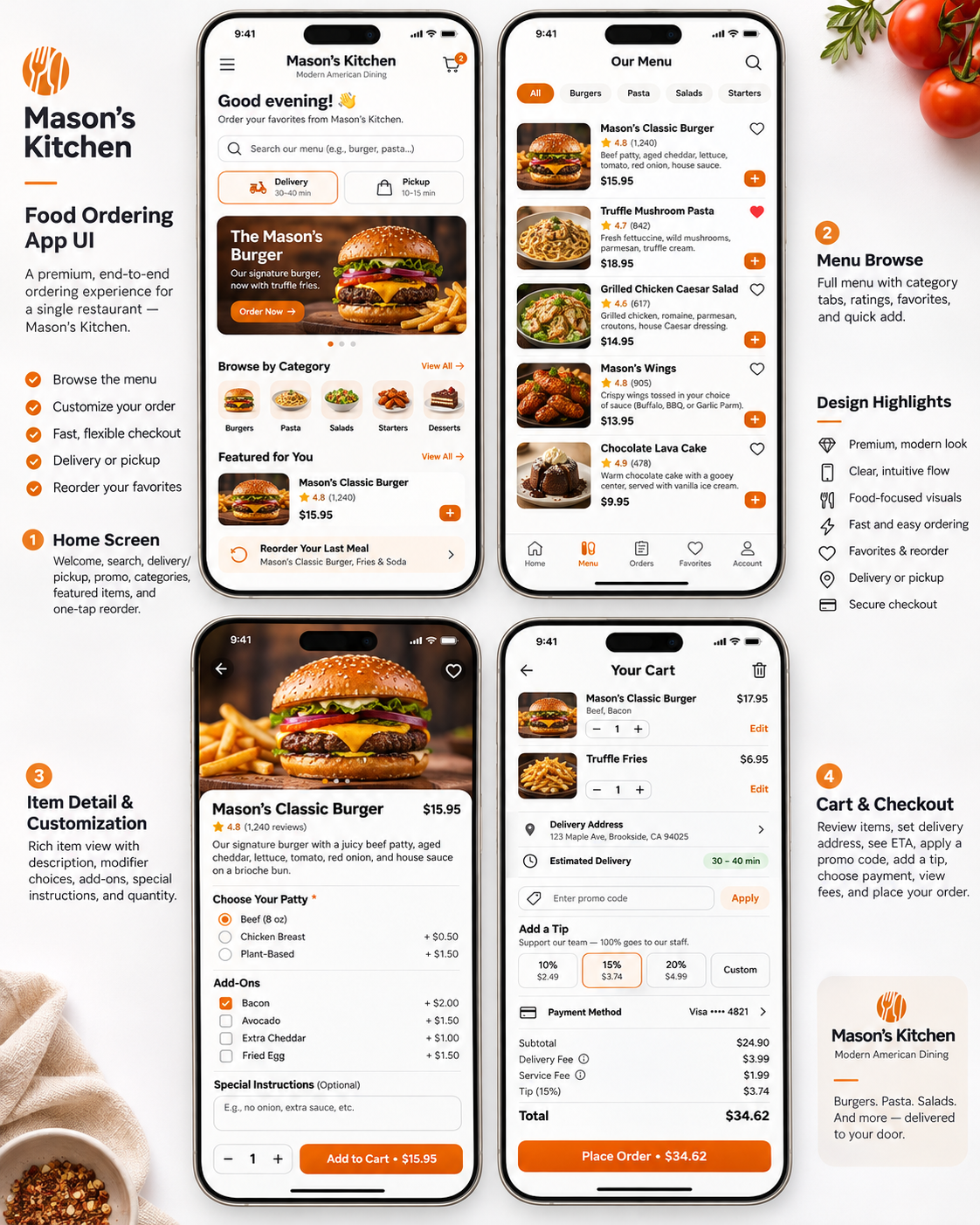
Sample restaurant app screens: home, menu, item customization and cart checkoutView full size
  1. 1
    Home screen

    Personal greeting, menu search, delivery or pickup toggle, featured promotion, categories, featured items and one-tap reorder of the last meal.

  2. 2
    Menu browse

    Your full menu with category tabs, photos, descriptions, ratings, favorites and quick add.

  3. 3
    Item detail & customization

    Large food photography, required choices, priced add-ons, special instructions and quantity.

  4. 4
    Cart & checkout

    Edit items, confirm delivery address and ETA, apply a promo code, add a tip, choose payment and review every fee before placing the order.

02

Order & delivery experience

After checkout, guests stay with your brand from confirmation to the doorstep.

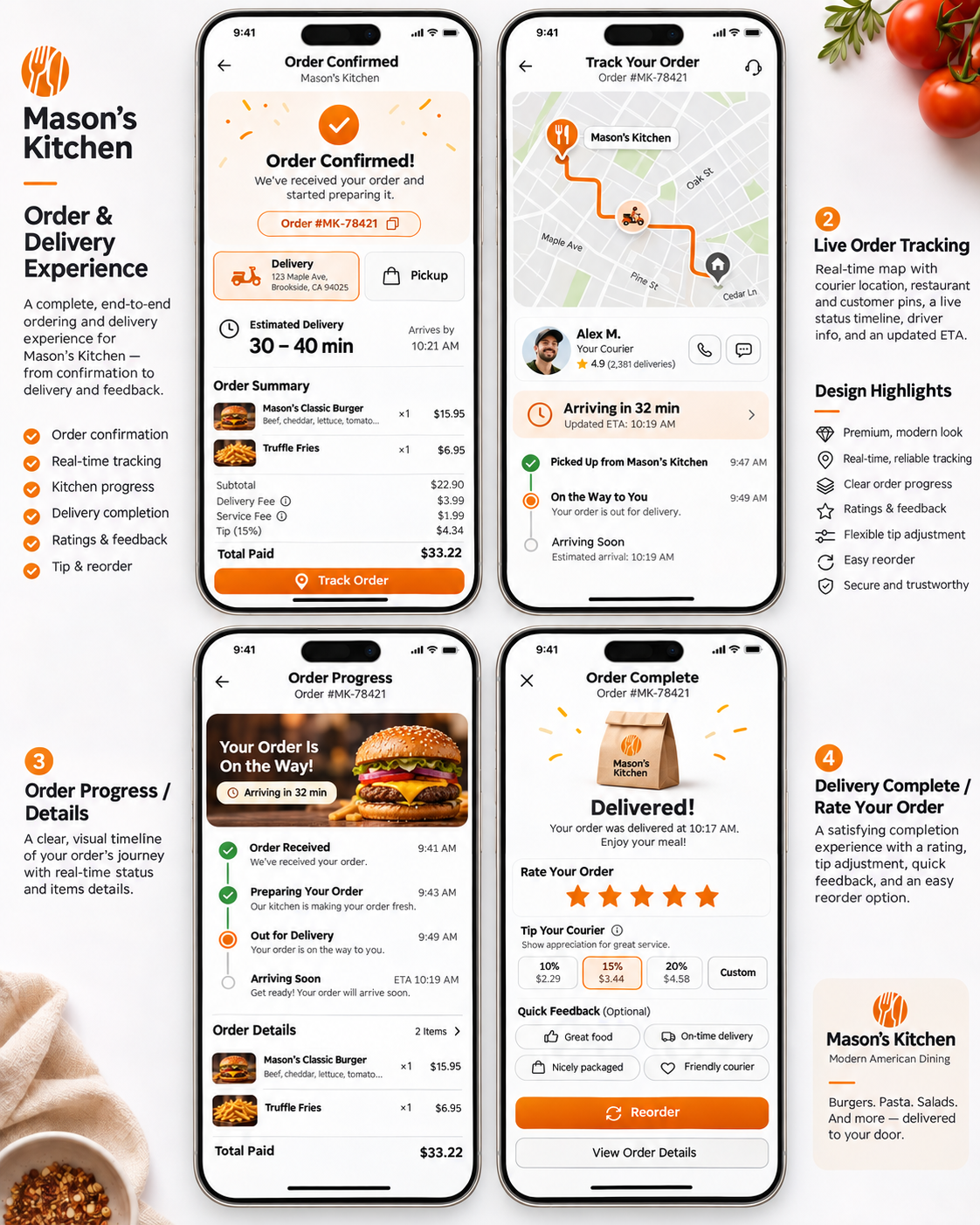
Sample restaurant app screens: order confirmed, live tracking, order progress and delivery complete with ratingView full size
  1. 1
    Order confirmed

    Order number, delivery or pickup details, estimated arrival time and an itemized summary of what was paid.

  2. 2
    Live order tracking

    Map with restaurant and customer pins, courier location and contact, and an updated ETA with a status timeline.

  3. 3
    Order progress

    A clear timeline — received, preparing, out for delivery, arriving — with the items in the order.

  4. 4
    Delivered & rate your order

    Star rating, courier tip, quick feedback tags, one-tap reorder and order details.

03

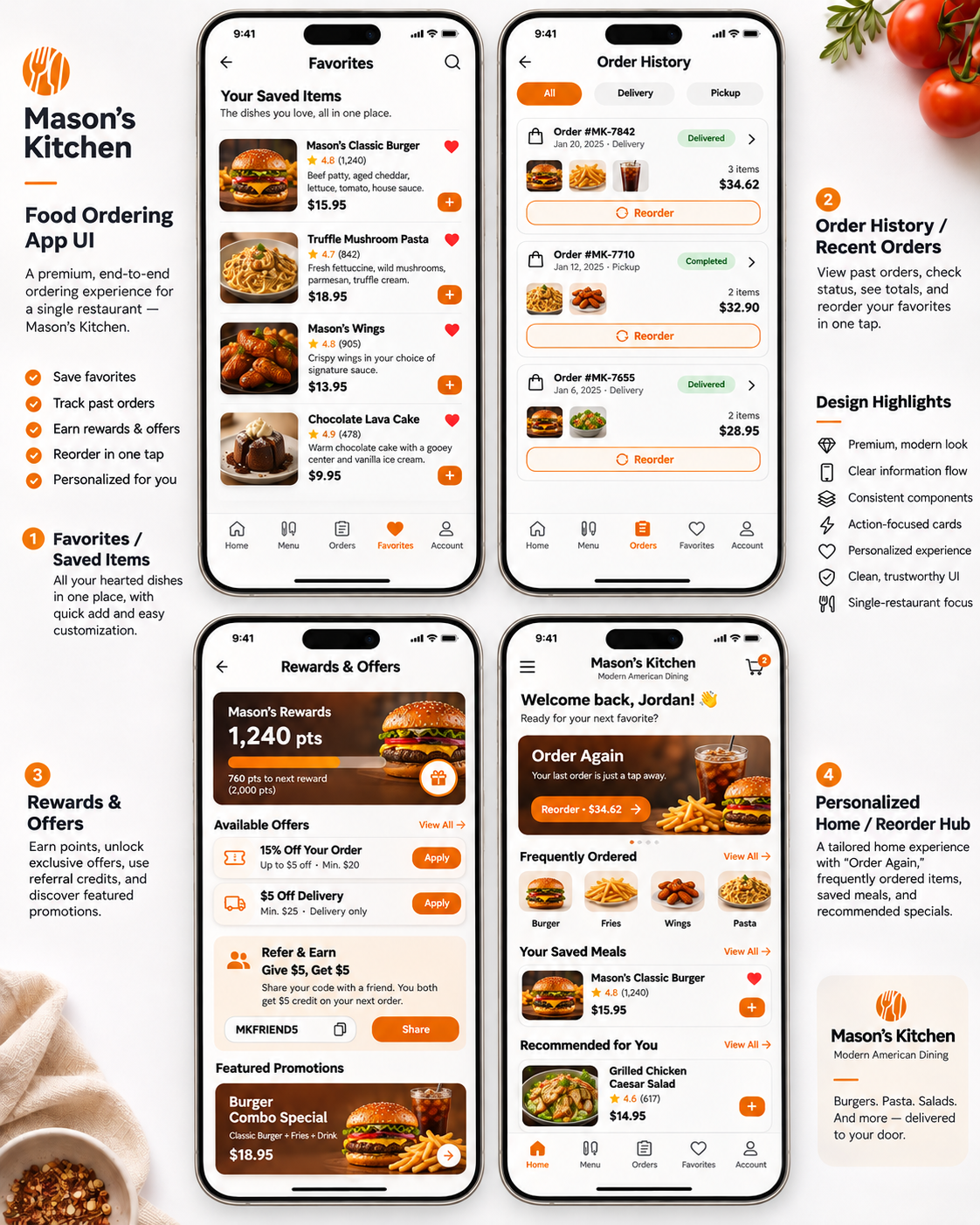
Favorites, history & rewards

The screens that turn a first order into a regular habit.

Sample restaurant app screens: favorites, order history, rewards and offers, and personalized homeView full size
  1. 1
    Favorites / saved items

    Every hearted dish in one place with quick add.

  2. 2
    Order history

    Past delivery and pickup orders with status, totals and a reorder button on each.

  3. 3
    Rewards & offers

    Points balance and progress, available offers, refer-a-friend credit and featured promotions.

  4. 4
    Personalized home

    “Order again,” frequently ordered items, saved meals and recommendations for a returning guest.

04

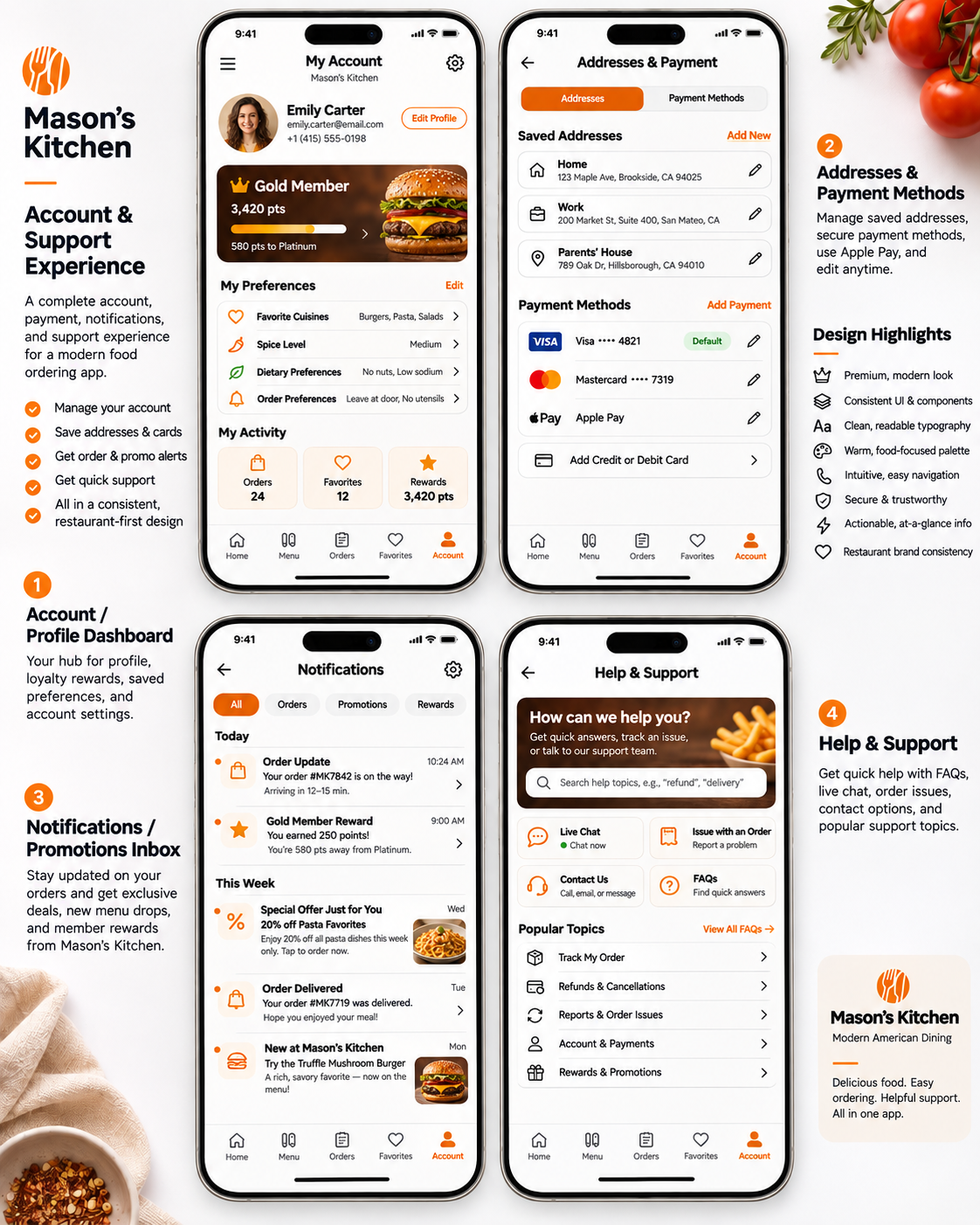
Account & support

Everything a guest needs to manage their account — without leaving your restaurant’s app.

Sample restaurant app screens: account dashboard, addresses and payment, notifications and help and supportView full size
  1. 1
    Account / profile dashboard

    Profile, loyalty status, saved preferences such as cuisines, spice level and dietary needs, plus activity totals.

  2. 2
    Addresses & payment methods

    Saved home, work and other addresses, stored cards and Apple Pay, all editable.

  3. 3
    Notifications inbox

    Order updates, reward alerts, special offers and new menu items, filterable by type.

  4. 4
    Help & support

    Searchable help topics, live chat, order issue reporting, contact options and FAQs.

Sample app designs with an illustrative restaurant, menu, prices and people. Features such as rewards, live courier tracking and notifications are configured for your restaurant during onboarding.

MAKE IT YOUR RESTAURANT

Set pickup, delivery, hours and menu details.

Your identity & menu
Restaurant branding, categories, photos, options, pricing and availability are reviewed for your actual setup.
Your receiving workflow
Verify how orders reach the kitchen and fit shared preparation capacity. We coordinate POS and marketplace connections around verified compatibility.
Your customer relationship
Authorized retail history remains restaurant-scoped. Guests separately choose whether to receive marketing.
Your fulfillment
We coordinate courier delivery alongside pickup, with service area, provider activation and charges confirmed during onboarding.

Review setup requirements
KEEP MORE. GROW MORE. BUILD MORE.

Build around your real menu.

Share your goals and operating setup. Choose the support you need before agreeing a launch.